January 2026: New Features and Enhancement Updates

As we step into February 2026, let’s recap the key system updates launched in January. These new enhancements are designed to help you manage your operations more efficiently, work smarter, and stay ahead in the fast-moving eCommerce market. From improving daily workflows to giving you better control and flexibility, these updates aim to create a smoother backend experience for your team — and a better shopping experience for your customers.

Let’s take a look at what’s new and how these improvements can support your business growth in 2026.

What's New in January 2026?

1. [App] New 'AI Business Insights' Turns Your Sales Data into Clear, Actionable Growth Signals

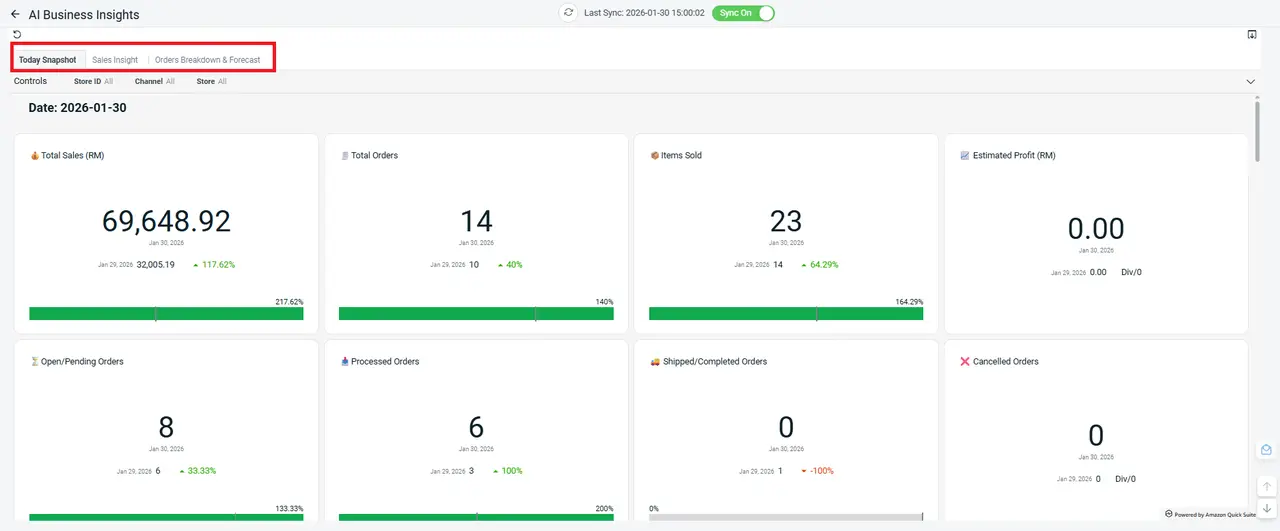
We’re excited to introduce AI Business Insights, a powerful new app designed to transform your sales data into clear, actionable insights. Instead of manually analyzing reports, the system now helps you quickly identify trends, spot potential issues, and uncover growth opportunities — all in one place.

There are 3 main reports available in this app:

i. Today Snapshot:
Get a quick overview of today’s sales performance

ii. Sales Insight:
Analyze trends and identify opportunities

iii. Orders Breakdown & Forecast:
Understand order patterns and plan ahead
2. [Order Processing] Gain Greater Flexibility with Support for Multiple Courier Profiles

We’re pleased to announce that multiple courier profiles can now be set up for the following supported couriers:

– NinjaVan (Malaysia)
– J&T Express (Singapore)
– KerryTJ 嘉里大榮 (Taiwan)
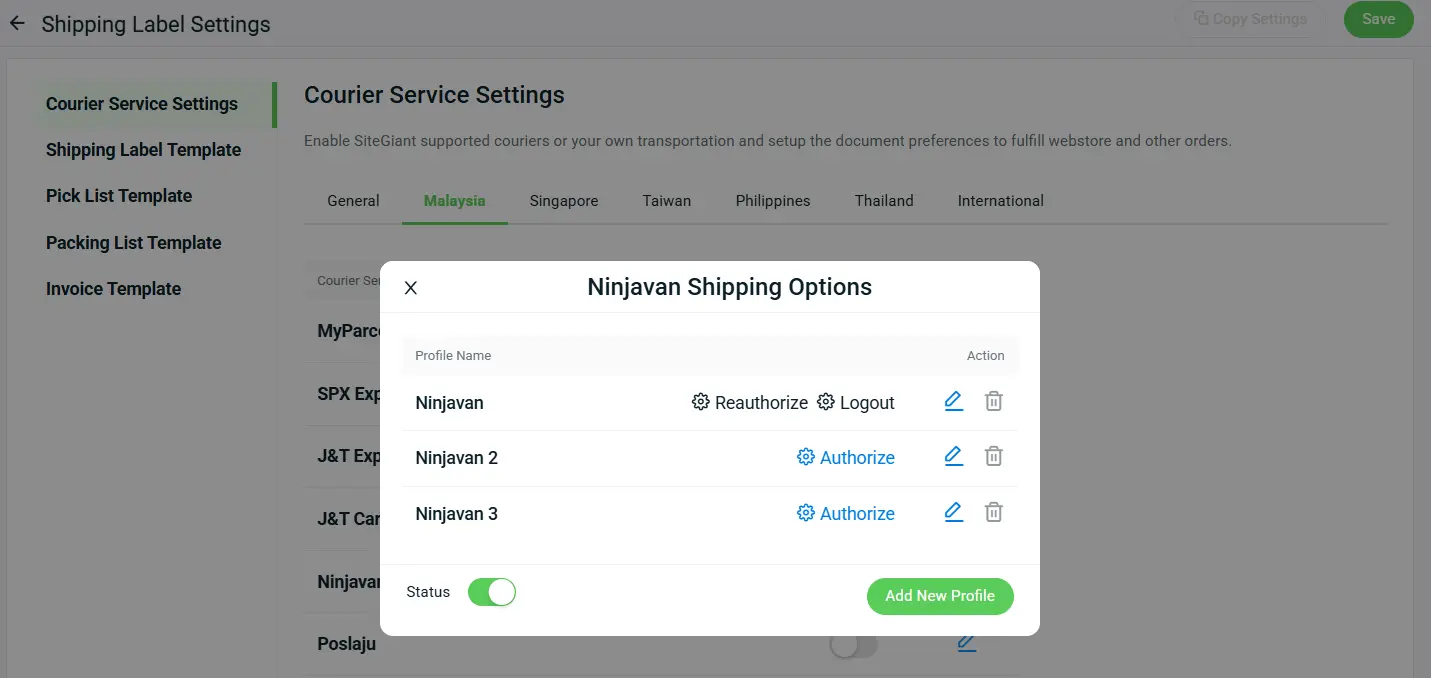
This feature is especially useful if you manage multiple warehouses, sender details, or shipping setups, giving you greater flexibility when arranging shipments.

To ensure accurate shipment setup, the courier status can only be enabled once at least one complete courier profile has been created.
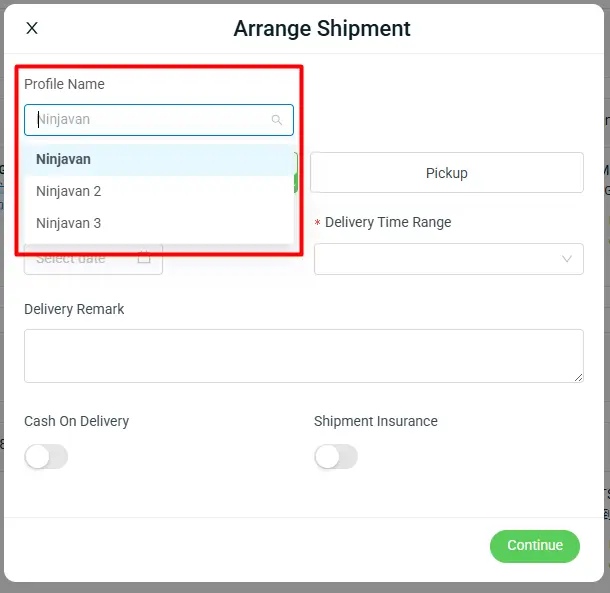
*Note: Courier profiles with incomplete information will not be selectable in the dropdown.
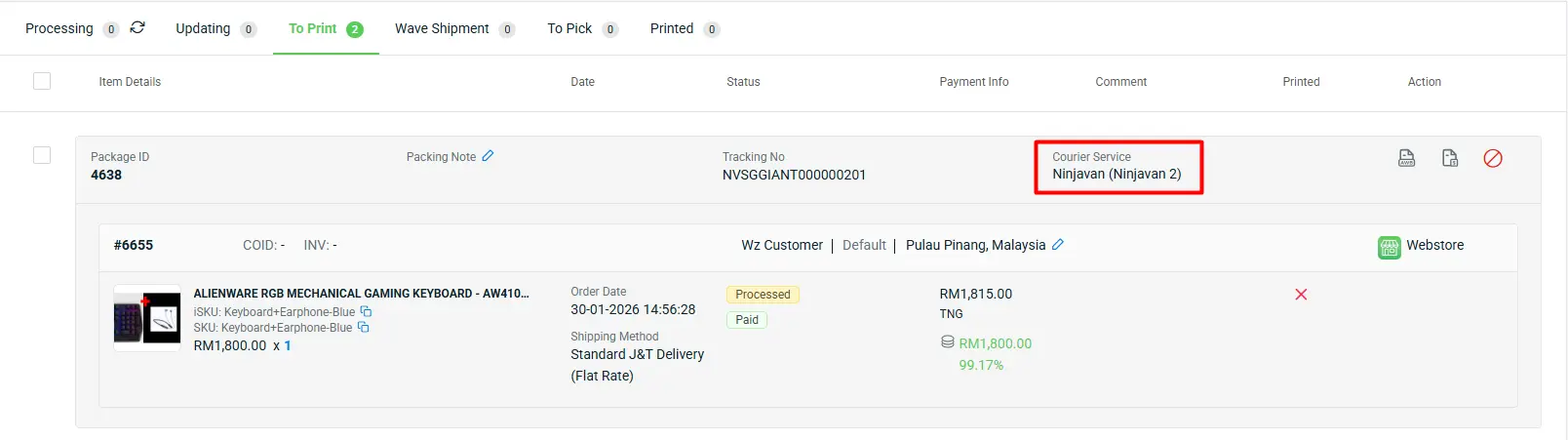
After arranging the shipment, if at least two profiles are available for a specific courier, the selected courier profile name will be displayed, as shown below.

3. [Accounting App] Access Your SQL Accounting Anytime, Anywhere with the New 'SQL Cloud Sync Integration'

We’re excited to introduce the Cloud Mode for SQL Sync. SQL Cloud is a web-based accounting platform you can access anytime, helping you stay productive wherever you are. It offers full database ownership, with no limits on invoices or storage capacity.

The benefits of using SQL Cloud Sync integration include:

i. Able to perform all the existing functions available in the original Desktop Mode.

– Sync Orders from SiteGiant to SQL as Sales Invoice.
– Sync Customer Payment from SiteGiant to SQL based on synced Sales Invoice to knock off payment.
– Sync Cash Sales, Sales Order, and Sales Invoice from SQL to SiteGiant for stock deduction across all channels.
– Sync Purchase Order from SQL to SiteGiant for stock in and stock updates across all channels.
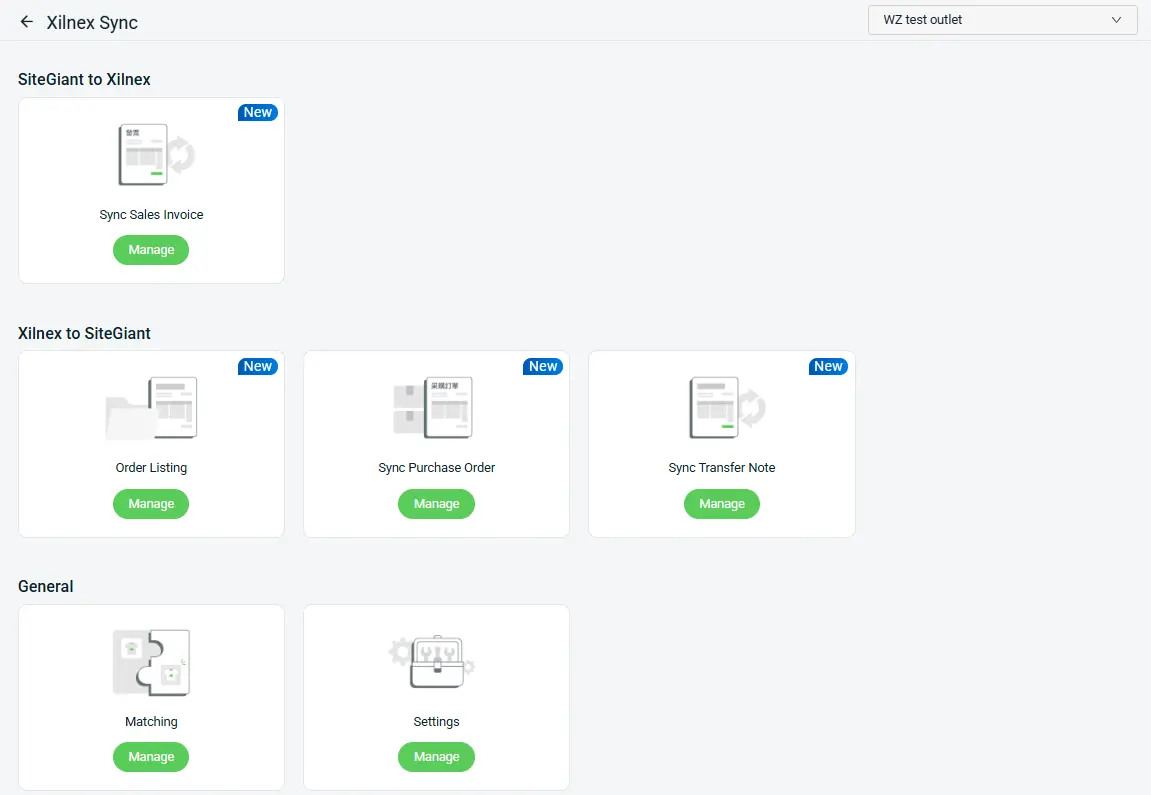
Note: SQL Purchase Order synced from Cloud Mode can only be received and stock in through SiteGiant ERP. These actions are not supported in SiteGiant ONE app.
ii. All the syncing will be done through SQL API, thus SQL Sync Software will not be needed.

Feature Enhancement You Shouldn’t Miss

1. [Orders] Future-Dated Manual Orders Now Supported
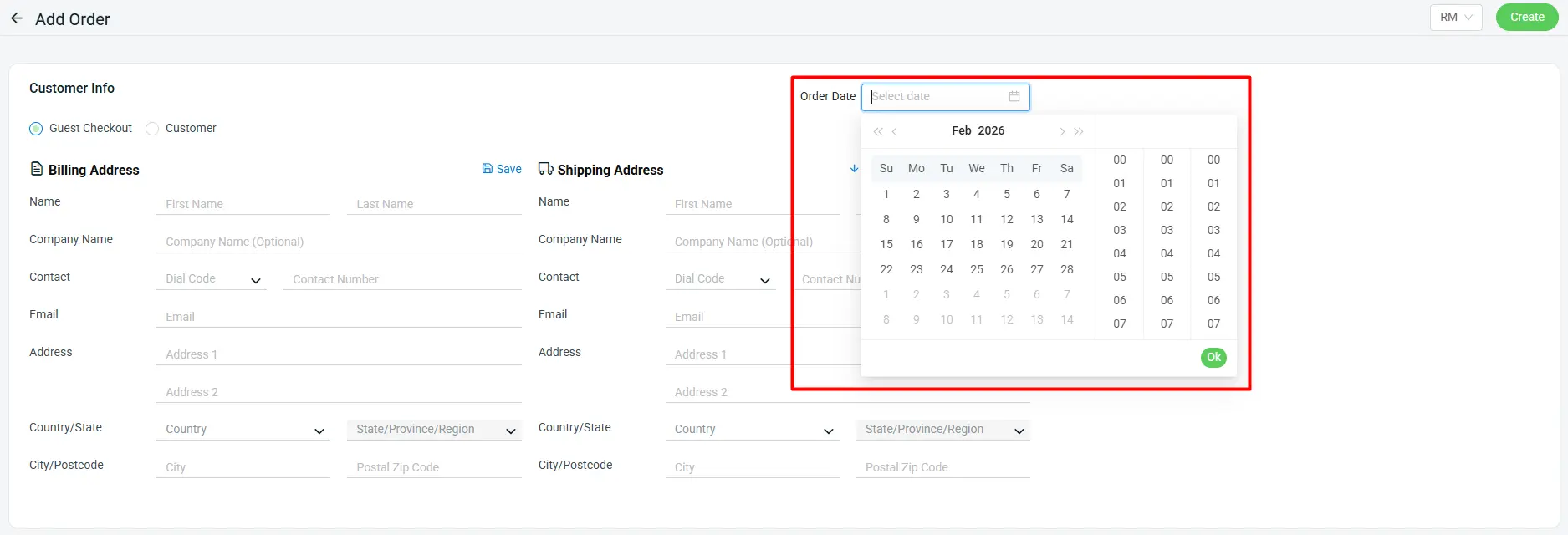
Under the Add Manual Order function, you can now create orders with a future date. This enhancement enables the system to deduct sellable stock in advance, helping you reserve inventory early and avoid overselling.

2. [Inventory] Create Kits in Bulk Using Excel Import
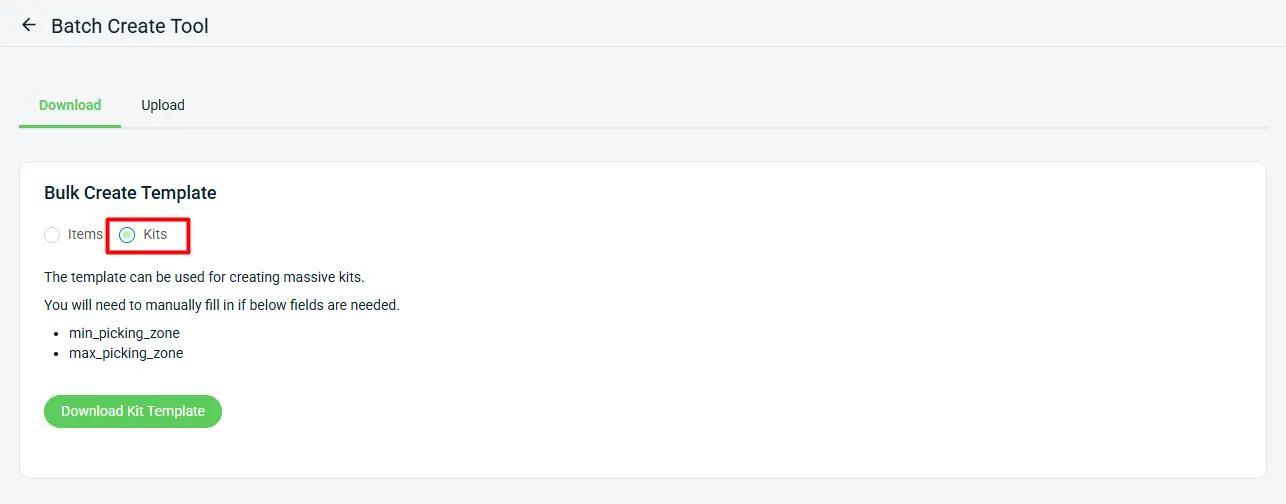
You can now create kits via Excel import, allowing you to upload and set up multiple kits in bulk — saving time and streamlining your inventory setup process.

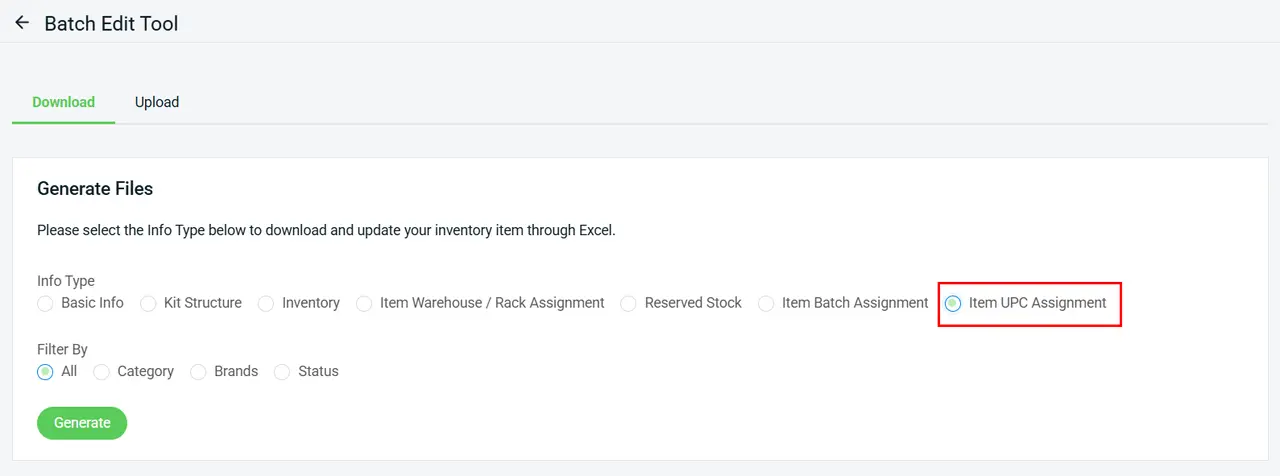
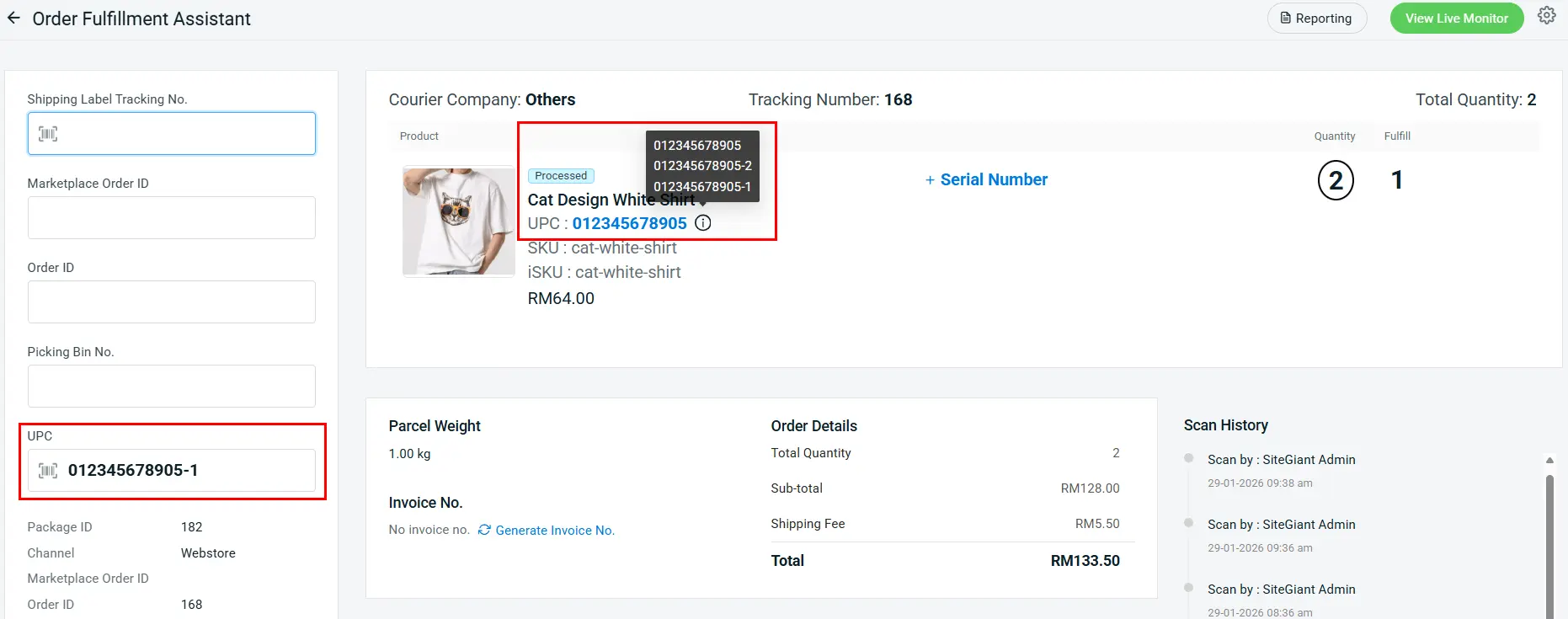
3. [Inventory] Flexible Scanning Made Easy for Items with Multiple UPCs
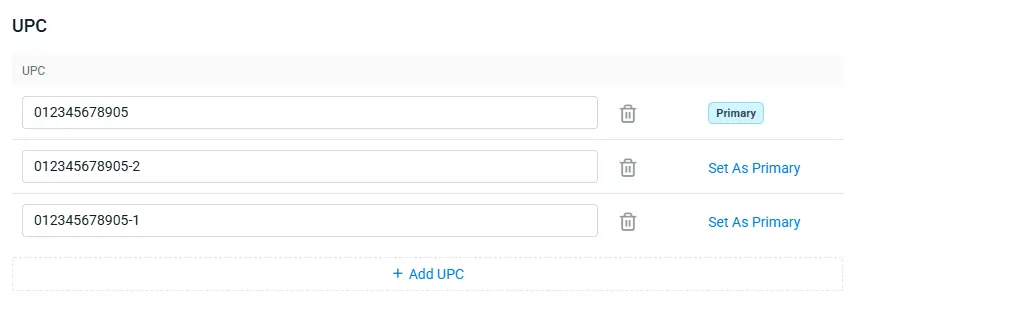
With the latest enhancements, you can now assign multiple UPCs to a single item, enabling smoother scanning and faster order fulfillment across your operations.
Remark:
i. Each item must set one Primary UPC, which will be displayed in AWB with Item List, Picking List, Packing List and Invoice.
ii. The new Item UPC Assignment Excel makes it easy to bulk assign multiple UPCs, saving time when managing large inventories.
iii. Scanning any UPC associated with an item across Order Fulfillment Assistant, Smart Fulfillment, ScanNPrint, SiteGiant ONE and SiteGiant POS will be recognized correctly.

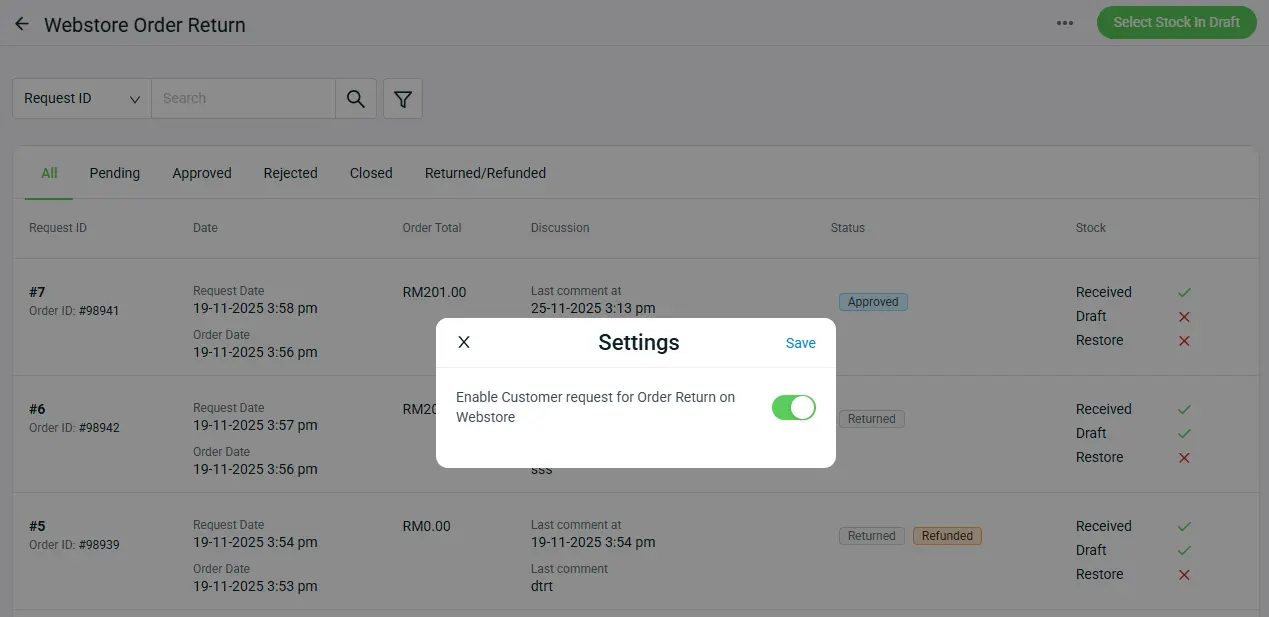
4. [Webstore] Customers Can Now Request Order Returns Directly from Your Webstore

A new setting has been added to your Webstore, allowing customers to submit order return requests directly through your webstore. This enhancement reduces the need for manual support handling, helping you manage returns more efficiently while streamlining the overall return process.
*Note:
i. This setting is enabled by default and can be disabled if not needed.
ii. When Turn OFF: customers will not be able to request returns on the webstore and must submit return requests manually.
5. [Webstore] Advanced Search Enhancements to Improve Product Discovery
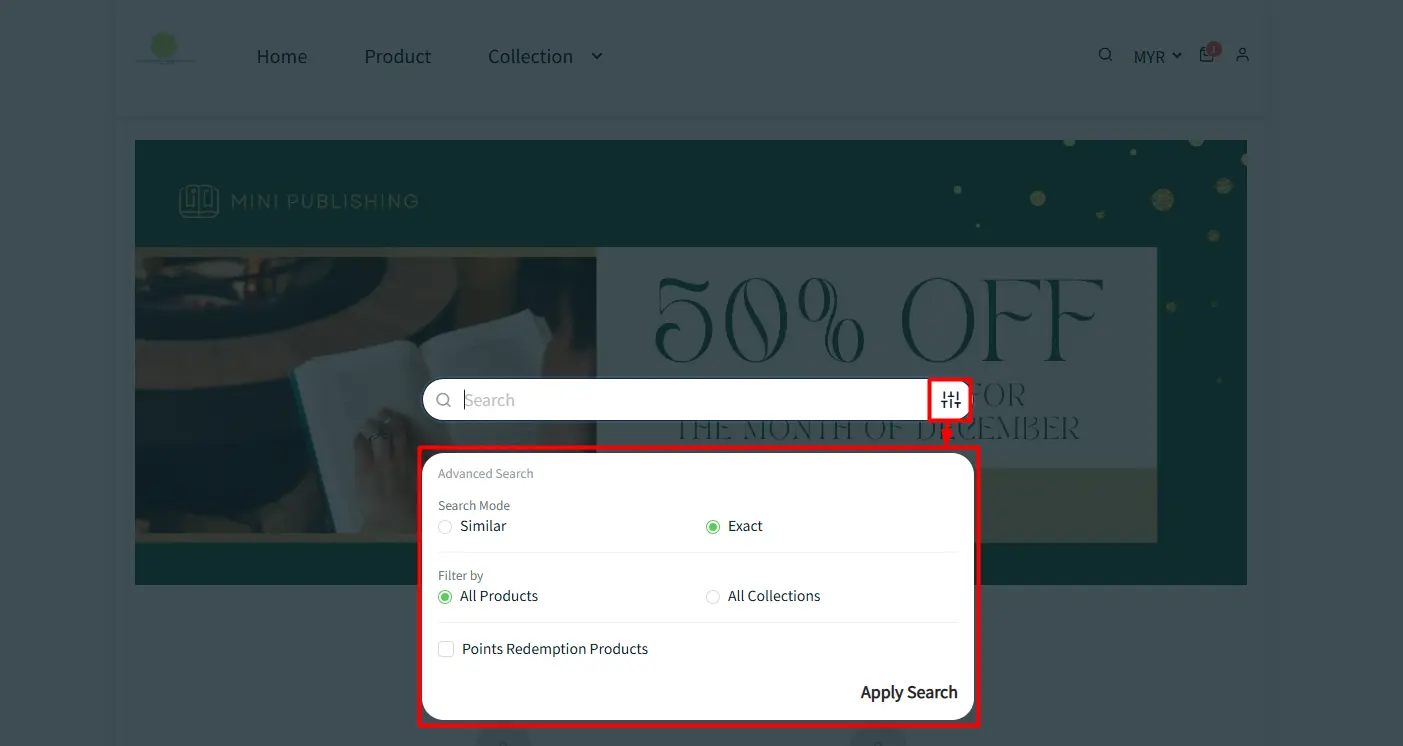
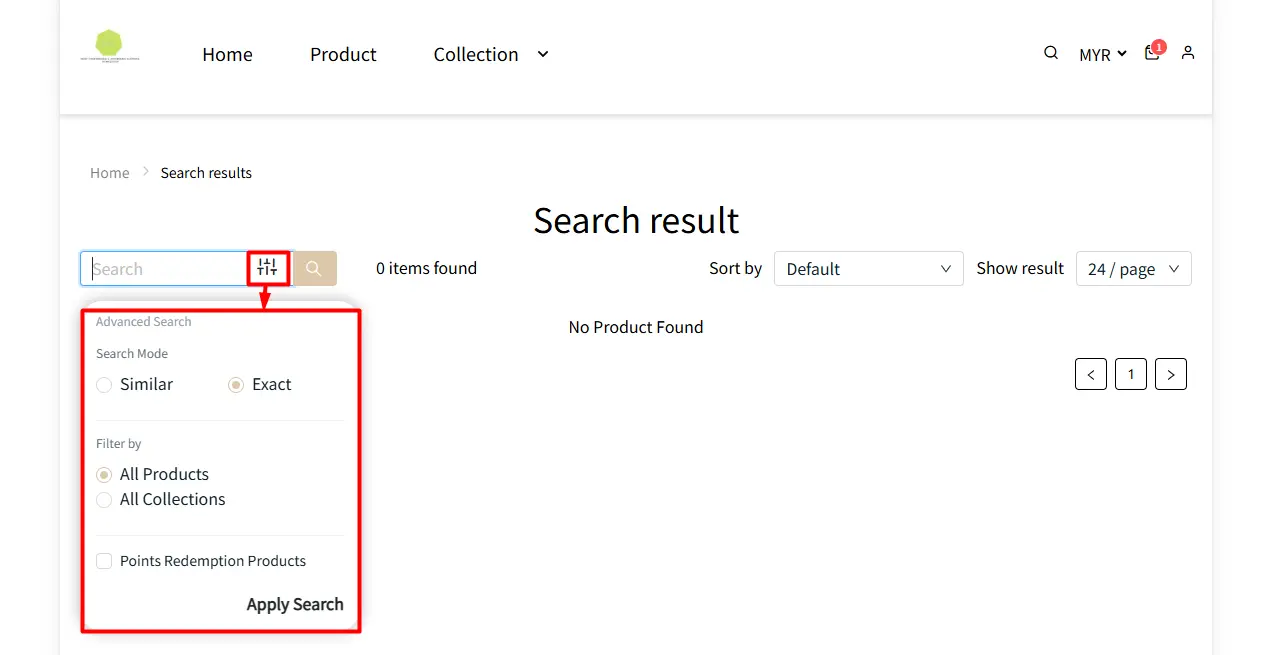
An “Advanced Search” option has been added to the header search bar and the product search results page, enabling customers to find products faster and more efficiently.

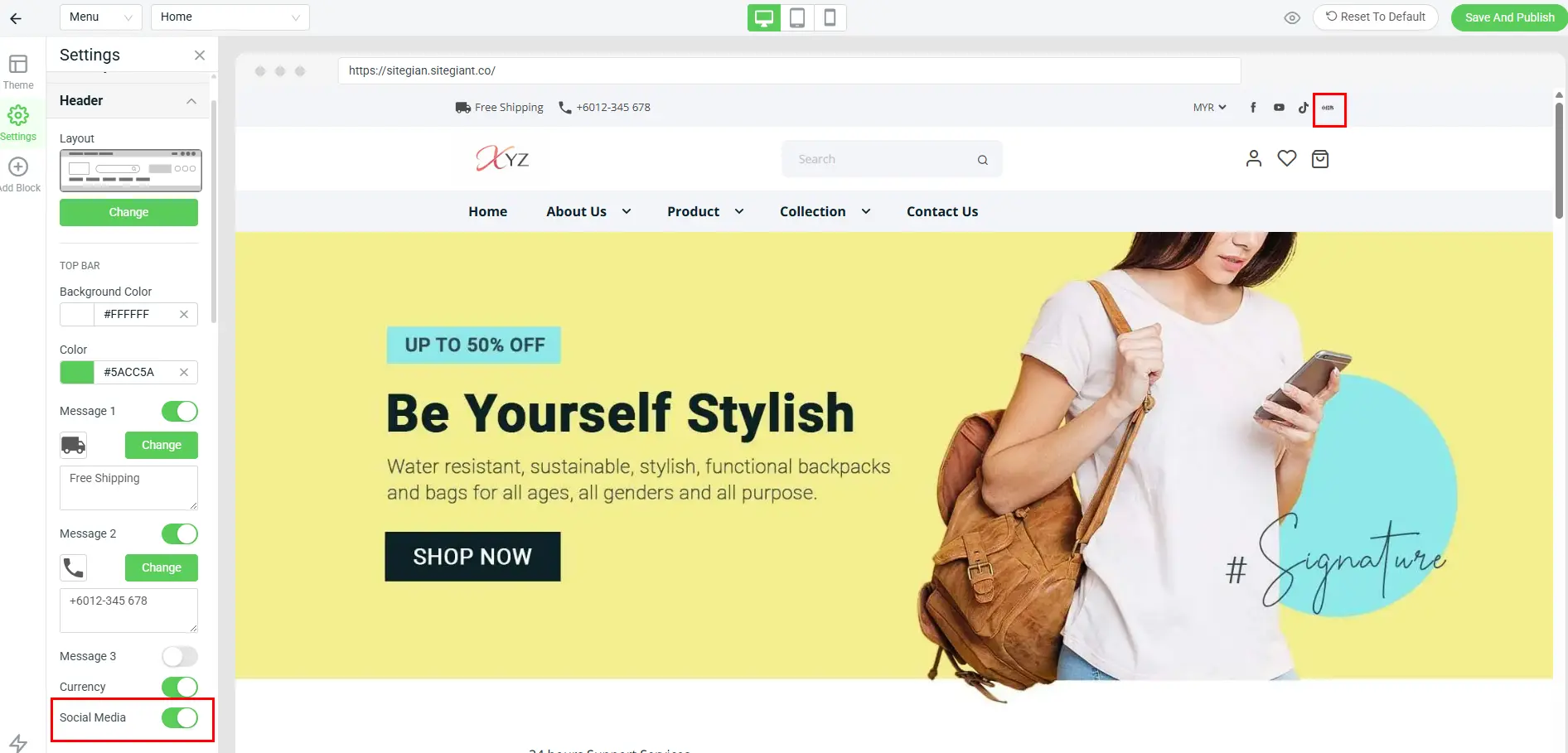
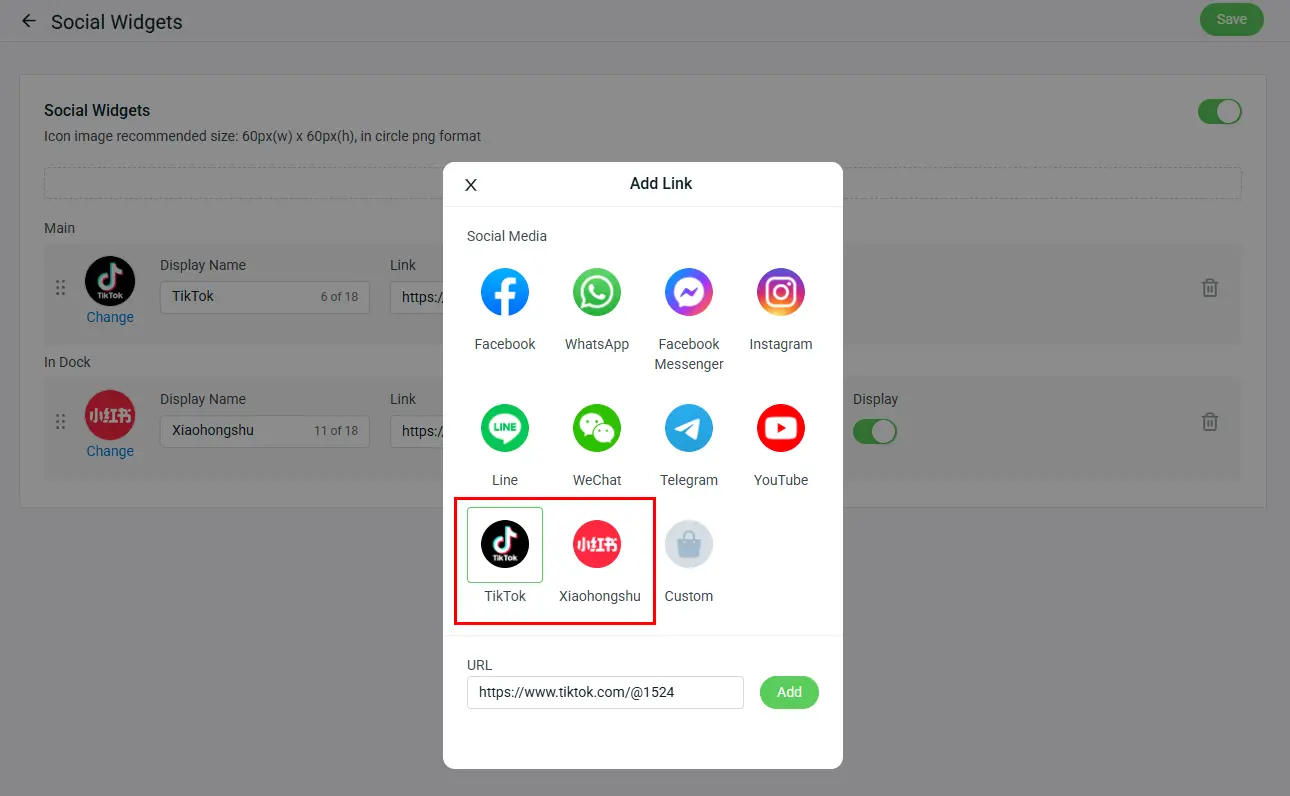
6. [Webstore] Display TikTok and Xiaohongshu Logo in Your Webstore to Boost Brand Visibility
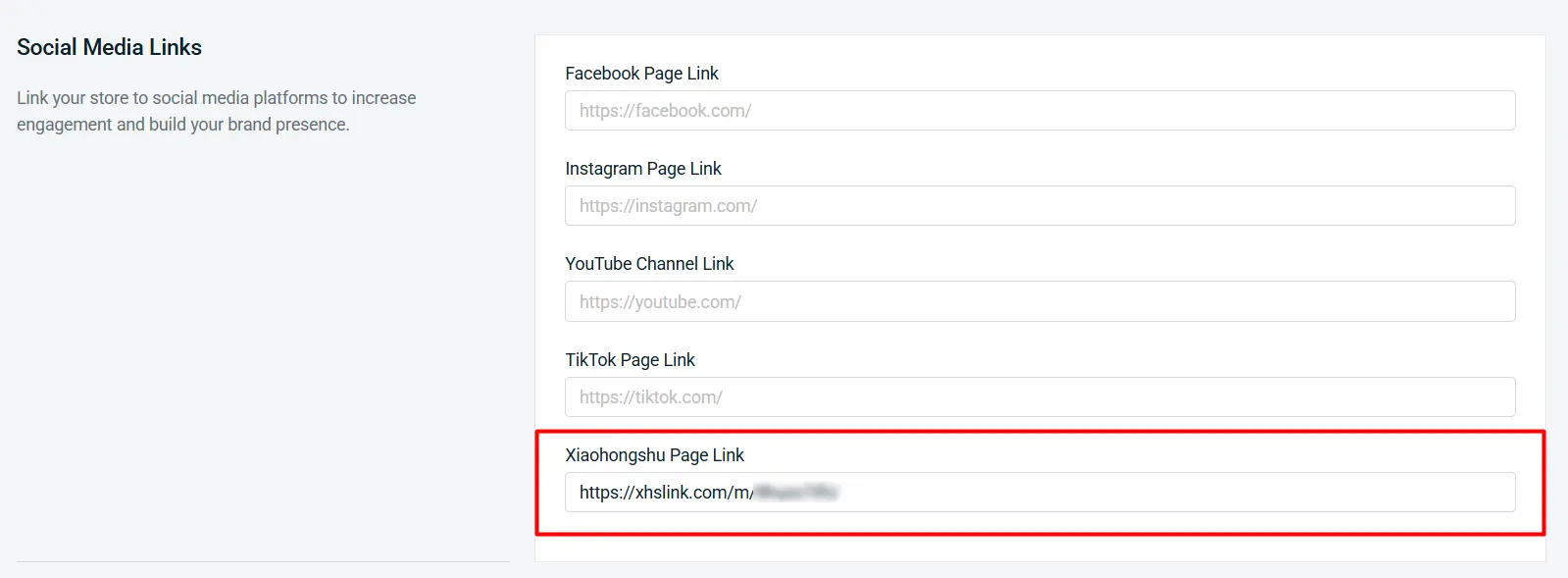
i. Xiaohongshu (RedNote) has been added to the Social Media Links settings, enabling you to direct customers straight to your Xiaohongshu profile.
ii. A new Xiaohongshu (RedNote) social media icon is now available in the Webstore Header & Footer when Social Media setting is enabled.
iii. The Social Widgets App now supports additional social media links: TikTok and Xiaohongshu (RedNote).

7. [Sales Channels] New Authorization Method for Connecting Your Shopify Channel
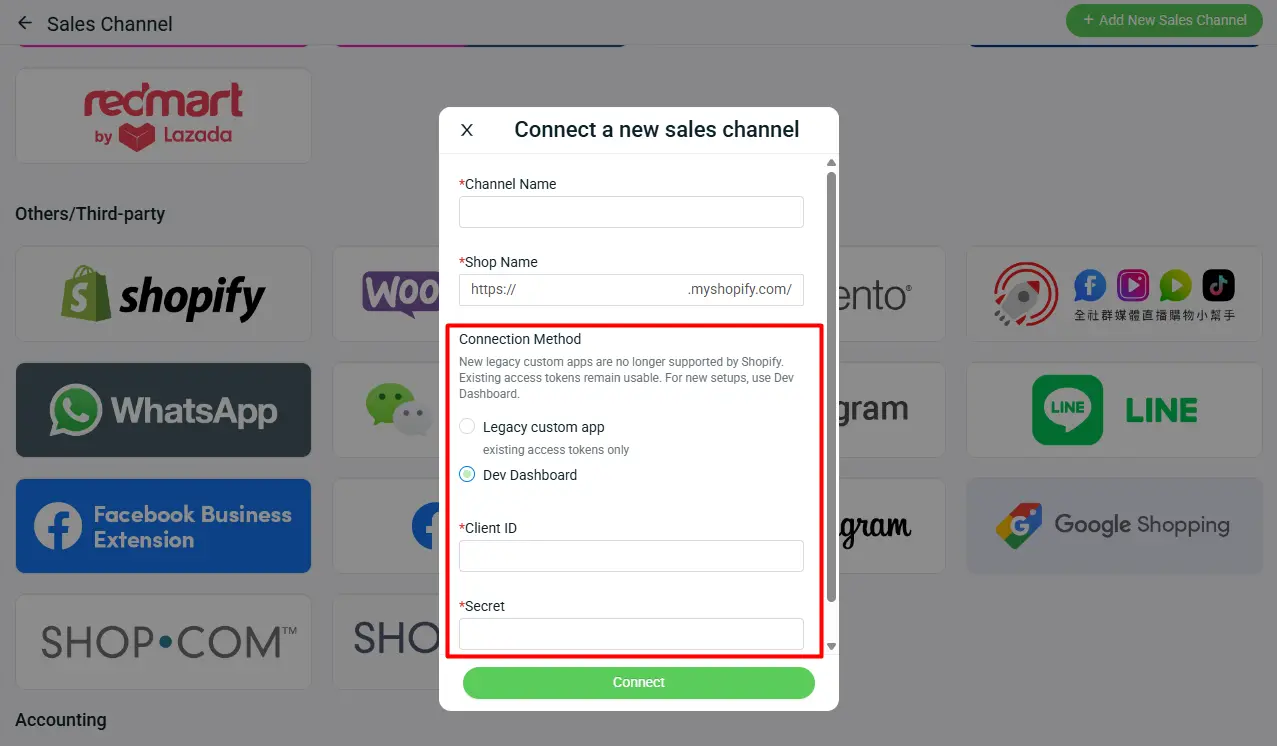
In line with Shopify’s latest platform changes, the authorization method for connecting Shopify channels to SiteGiant has been updated.
🔐 New Authorization Method
Shopify has introduced a new authorization method via the Shopify Developer Dashboard. Moving forward, this will be the default and recommended way to authorize new Shopify channel connections with SiteGiant.
*Note: Starting 1 January 2026, Shopify no longer allows the creation of new Legacy Custom Apps, which was previously used to authorize Shopify channels.

8. [Settings] Full Control Over Data Display Across Key System Pages

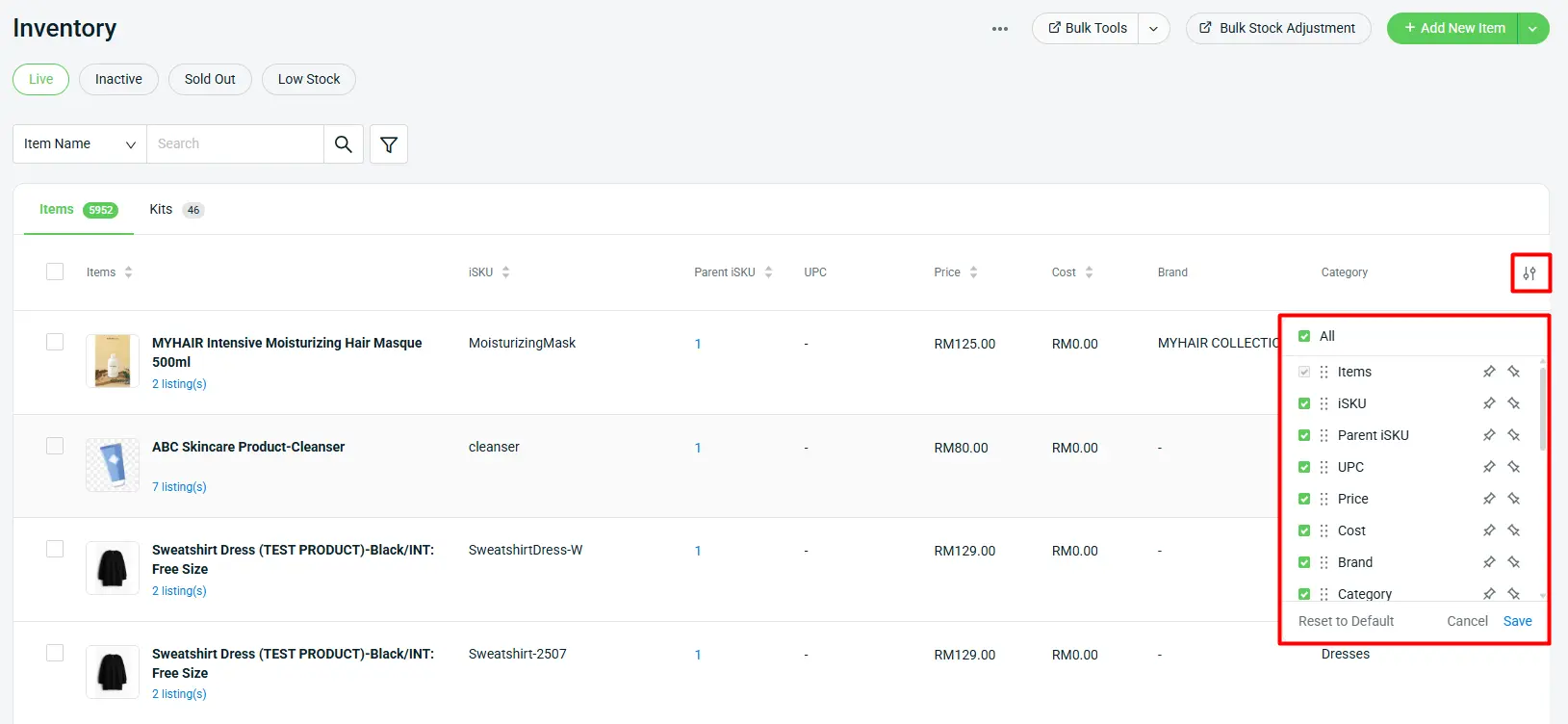
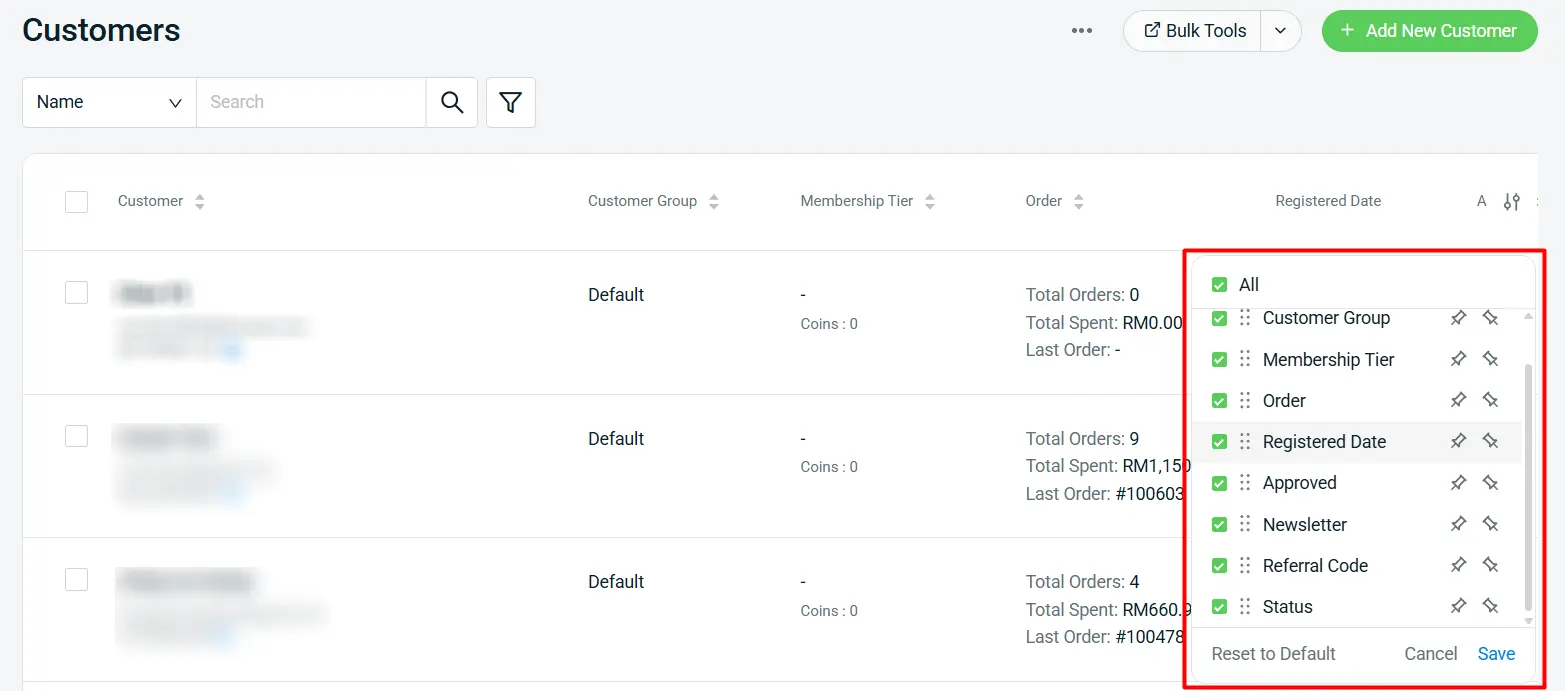
With the latest update, we’ve improved the way you view and manage data in the system — giving you greater control and clearer visibility across your daily operations.

With this update, you can:
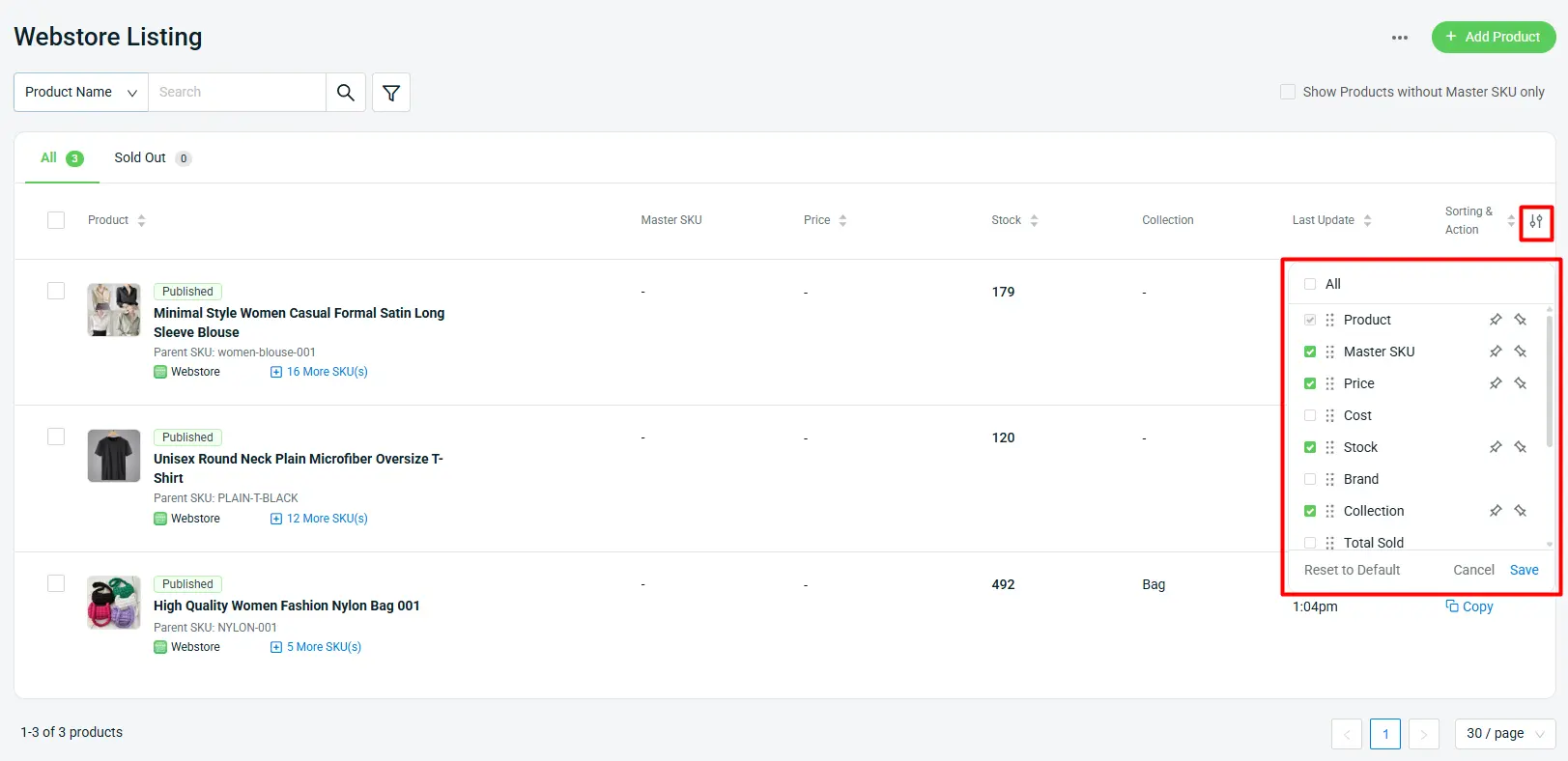
– Control column visibility
– Drag & drop to reorder columns
– Pin columns to the left or right (maximum: 3 columns)
– Reset to default anytime
*Note: This update is applicable for Webstore Listing, All Inventory Items & Customers page
i. Webstore Listing
New Columns: Cost, Brand, Total Sold, Weight, Dimension and Product Status
ii. Inventory Items
New Columns: UPC, Cost, Brand, Category, Weight, Total Sales Quantity, Allocated Stock, Non-Sellable Stock, Non-Sellable Allocated Stock, Campaign Reserved Stock, Reserved Stock, On Hold Stock and Stock Status
iii. Customers
New Columns: Newsletter and Referral Code

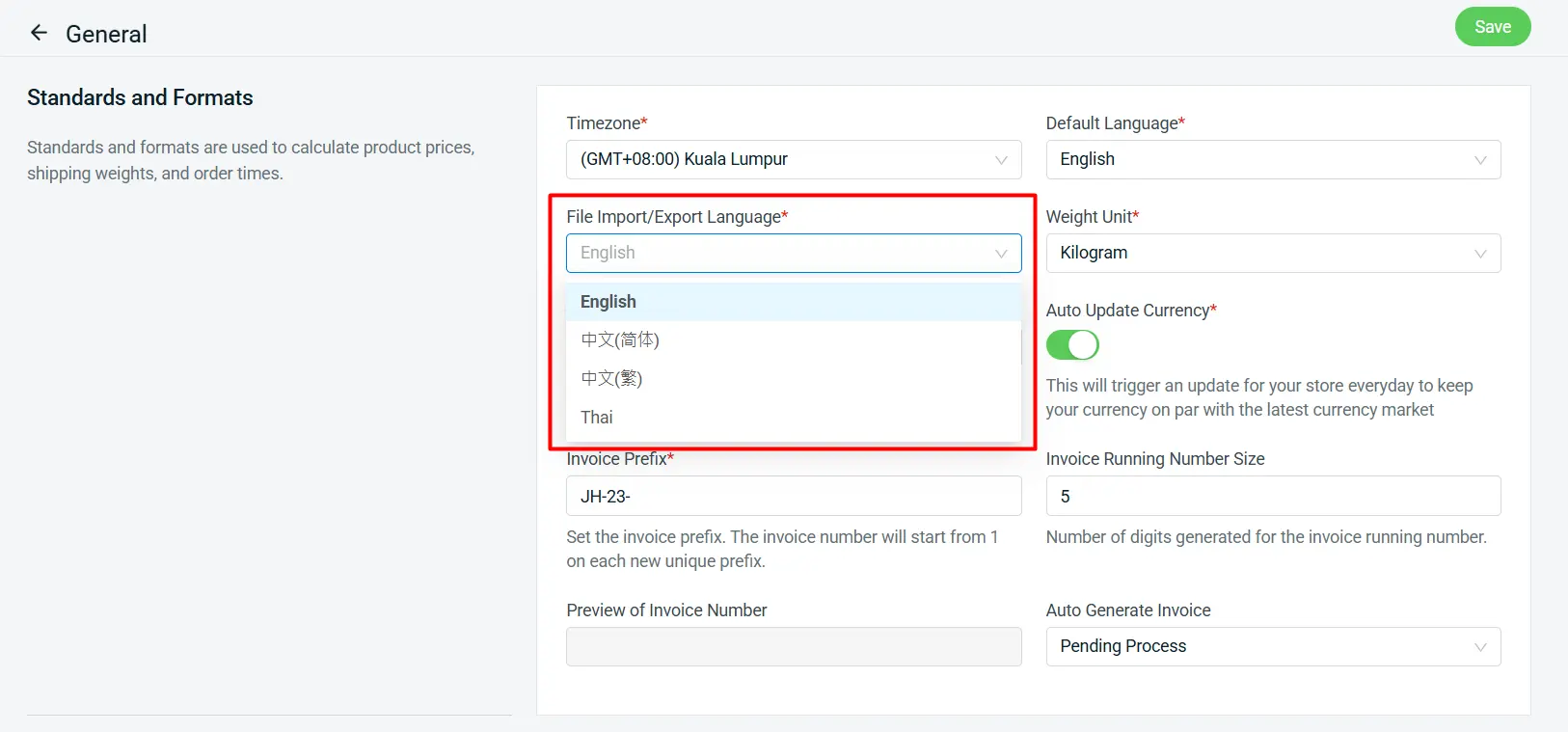
9. [Settings] Import and Export Files in Your Selected Language for Greater Clarity

With this latest enhancement, you can now select your preferred language for import and export files, ensuring greater clarity and accuracy when managing your data.
*Note: This feature is currently available only on the All Orders page (Export Orders & Batch Create)

Supported languages:
– English
– 中文(简体)
– 中文(繁体)
– Thai
10. [Email] Set Your Own Email Address as the Sender for System Emails
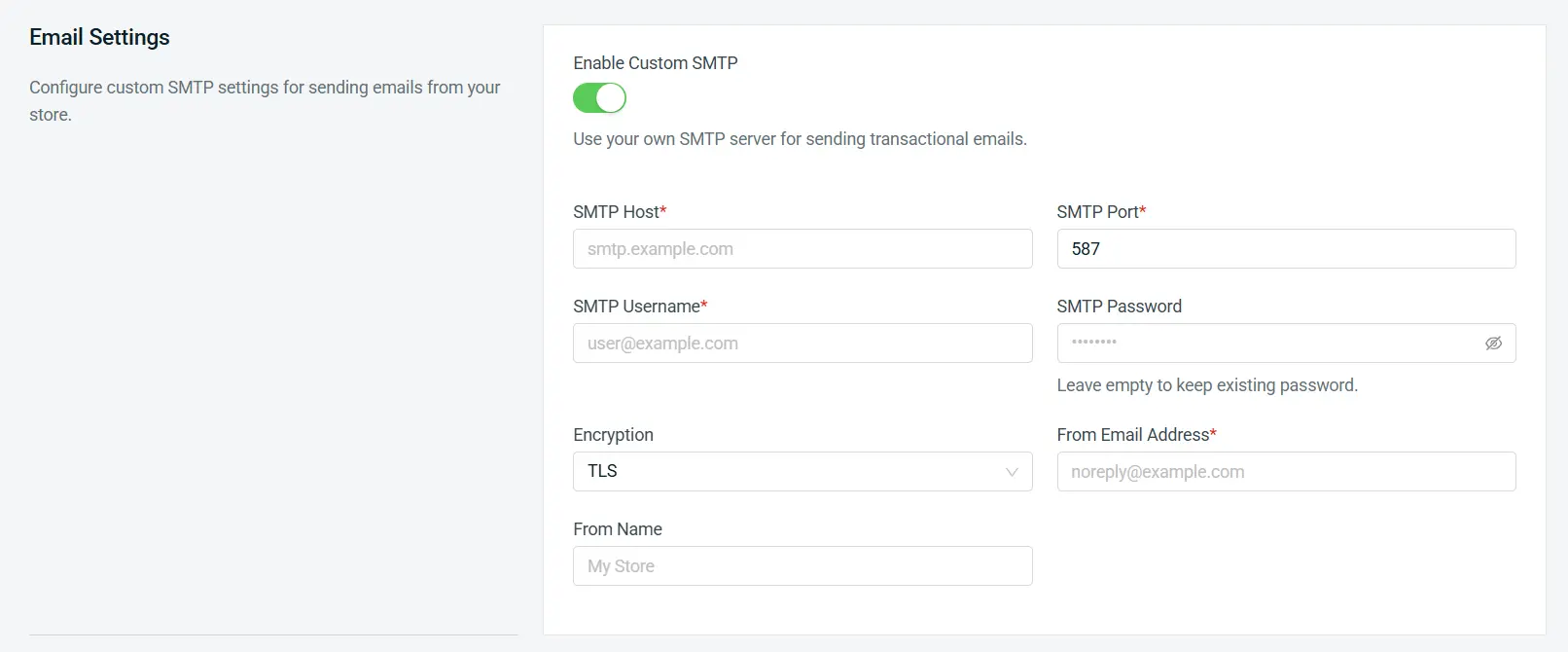
With the latest enhancements, you can now set your own email address as the sender for system emails. This gives you greater control over your brand communication and ensures emails are sent directly from your business domain.

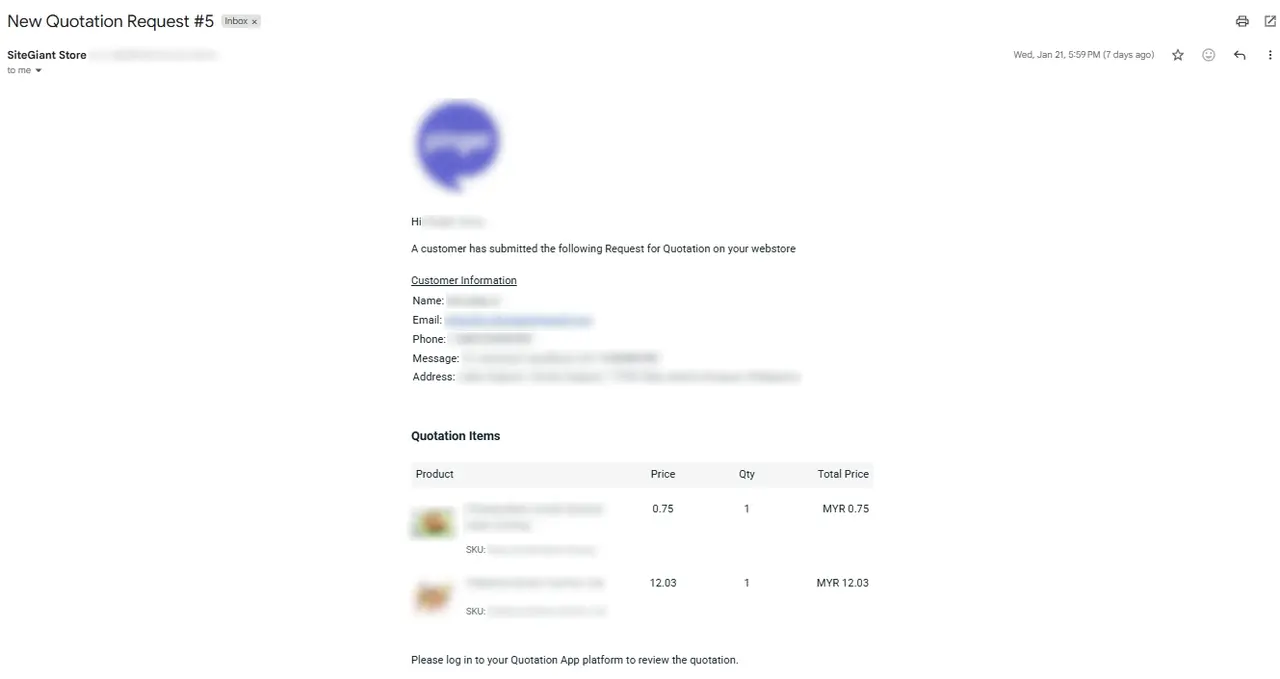
11. [Quotation] Get Email Notifications for Webstore Quotation Requests
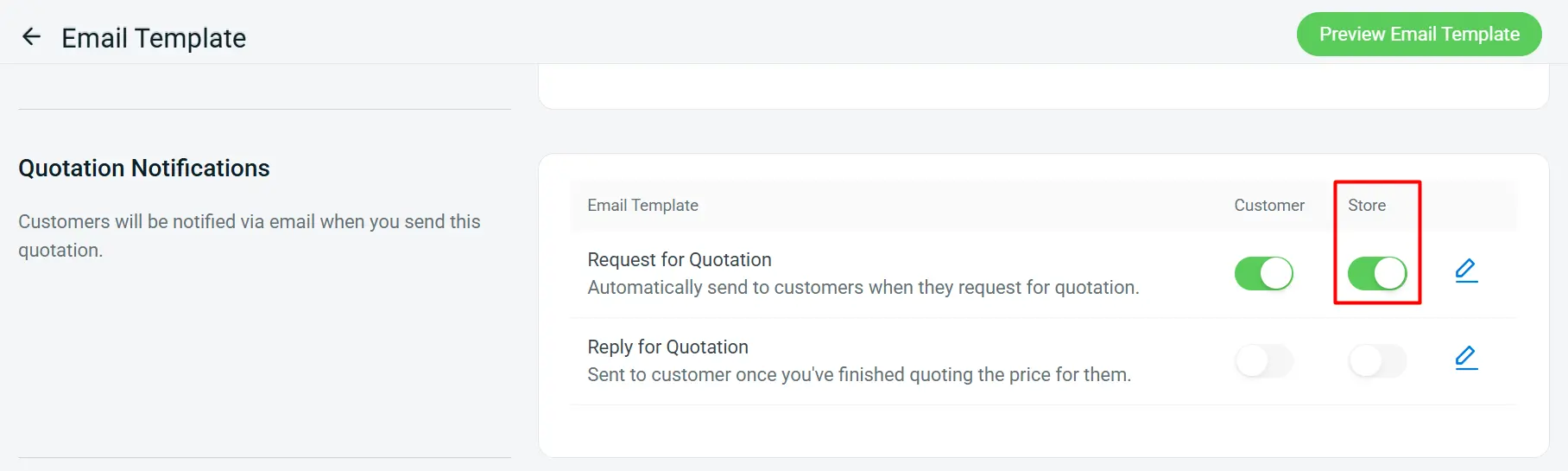
With this latest enhancement, you can now configure the system to send email notifications to your store email whenever a customer submits a quotation request through your Webstore — ensuring you never miss a potential sales opportunity.

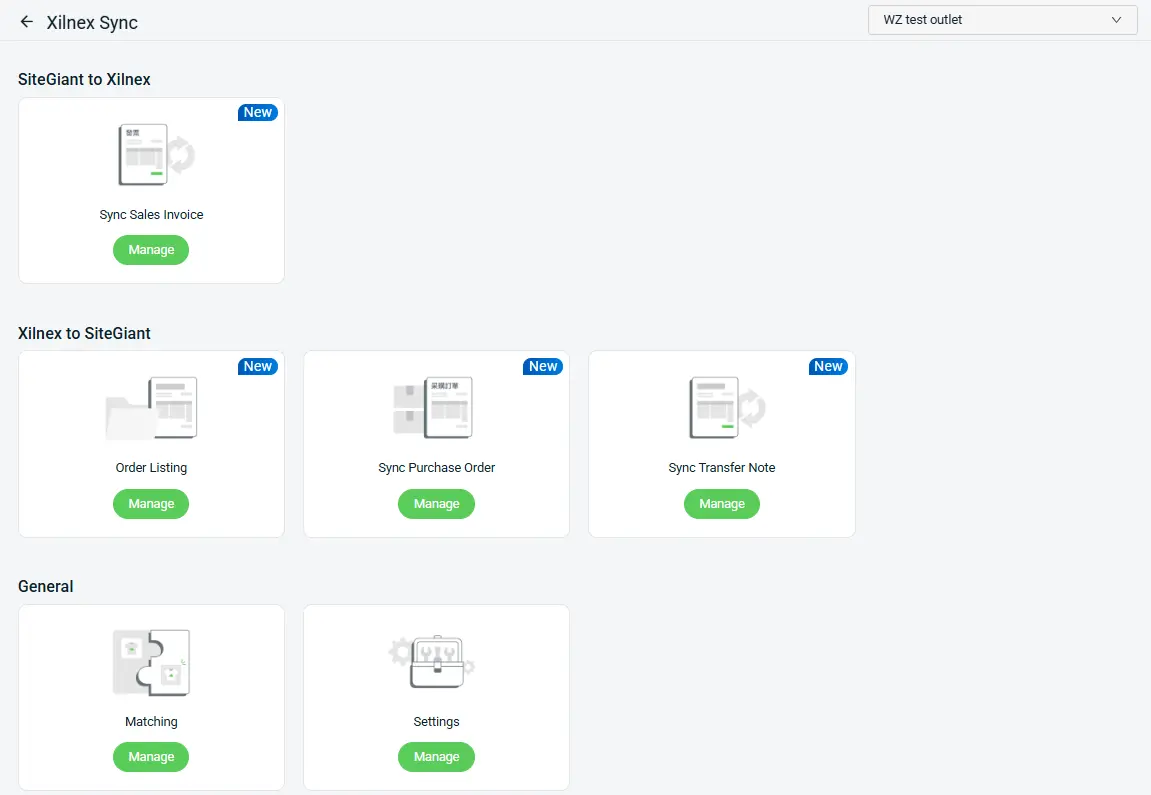
12. [Accounting] Xilnex Is Now Categorized under the Accounting App Section
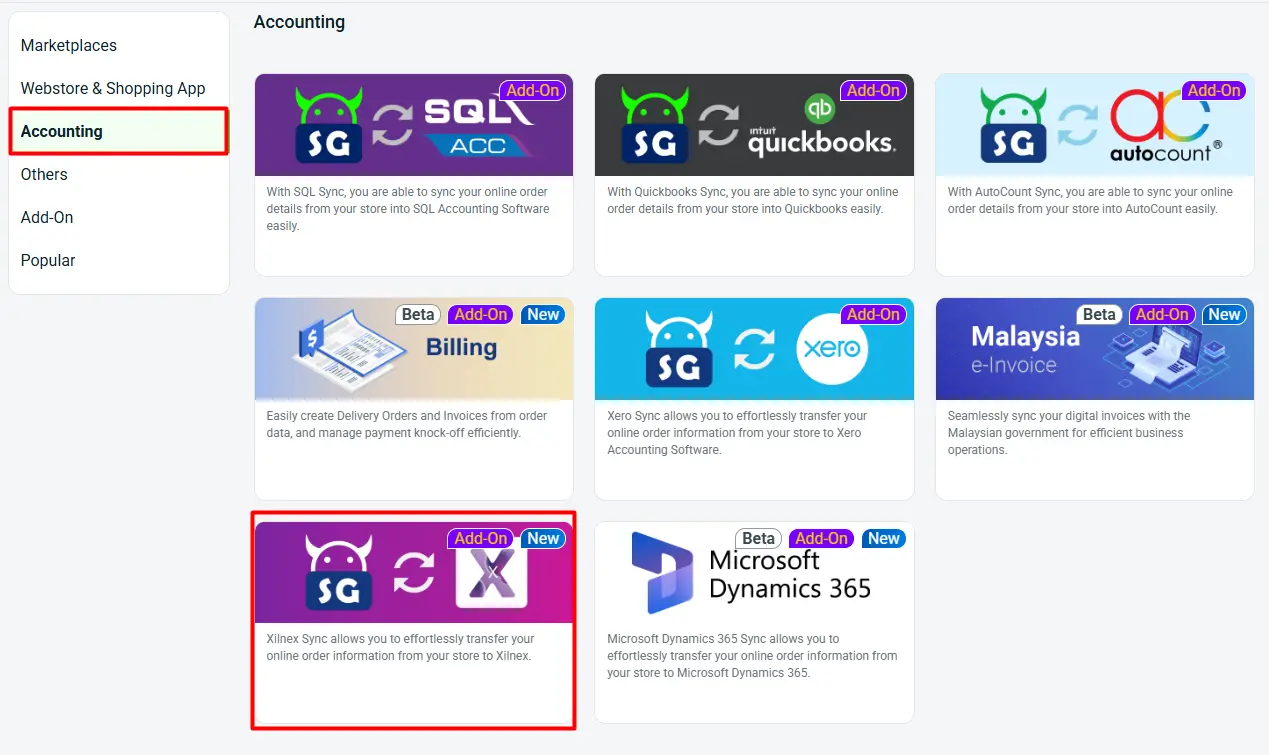
Xilnex has been restructured and is now categorized under Accounting app section. The previous Xilnex product listing has been removed as it is no longer applicable.
*Note: Any existing inventory linking from the previous Xilnex setup will be automatically carried forward to the new Xilnex Item Matching Page, so no relinking is required.

The new Xilnex Accounting Sync now supports:

  • [NEW] Sync ERP Orders to Xilnex as Sales Invoices
  • Sync Xilnex Sales Invoices back to ERP as ERP Orders
  • Sync Xilnex PO to ERP → Create ERP PO → Stock In ERP PO → Sync Goods Received Note back to Xilnex
  • Sync Xilnex TN to ERP → Create Stock Out → Sync Delivery Order back to Xilnex
  • [NEW] Perform Item, Shipping, and Customer Matching
  • [NEW] Configure channel & preset settings, and perform Item sync-back
13. [POS] Supports Product Search by UPC
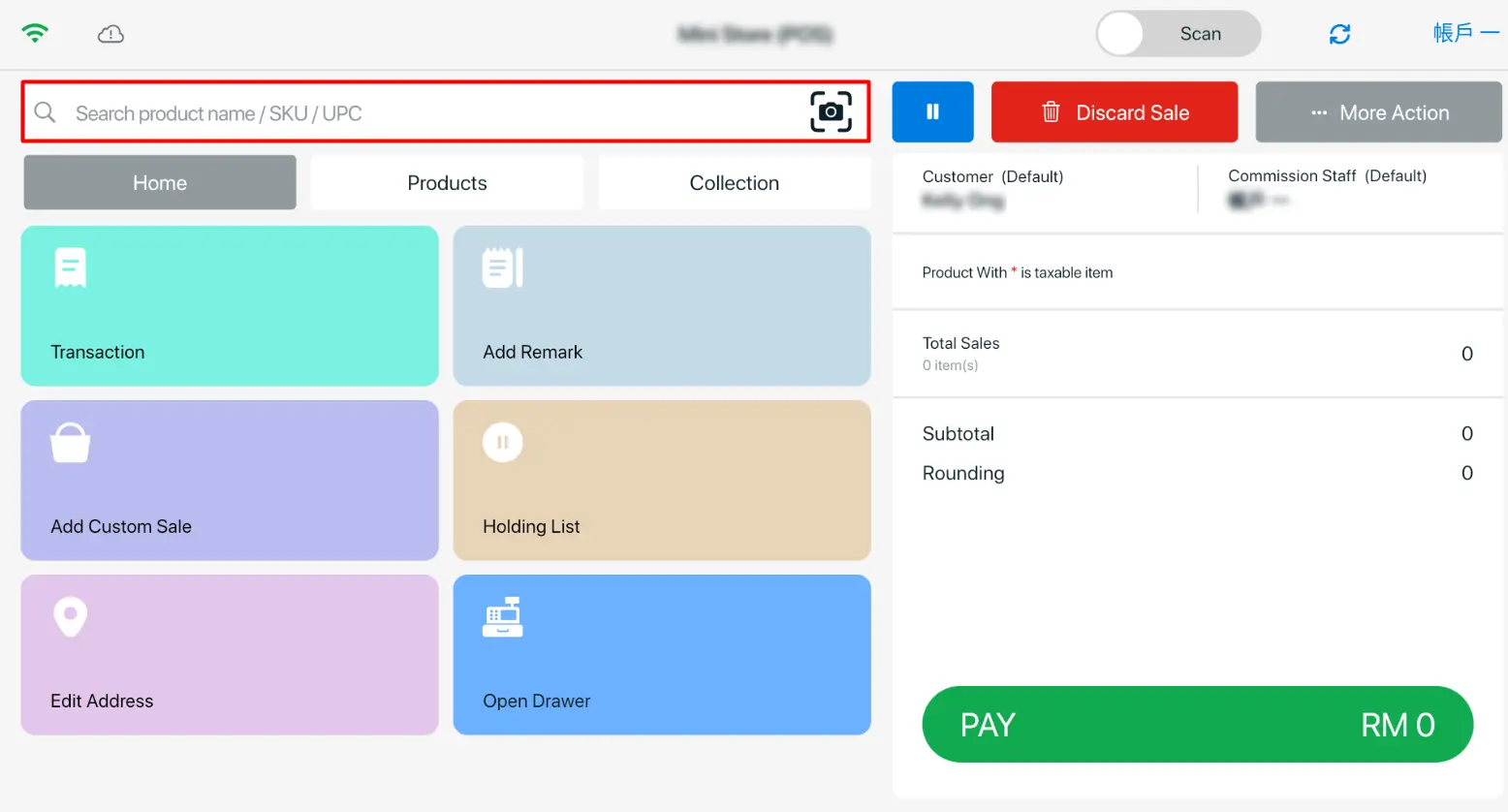
With the latest enhancements, you can now search for products by UPC, improving operational efficiency and streamlining the checkout process.
Check out these new features in SiteGiant today, and stay tuned for more updates.
Terms and Conditions

1. The SiteGiant x Lalamove First Time 10% Top-Up Bonus Campaign (the “Promotion”) is provided by LALAMOVE MALAYSIA SDN BHD (COMPANY NO. 1277201-W) (“Lalamove”) and SiteGiant Sdn Bhd (“SiteGiant”). By participating in the Promotion by registering via this link: https://sitegiant.my/lalamove-integration and/or receiving the Bonus (as defined below), this indicates you understand and agree to be bound by these Terms.

2. You are eligible to participate in the Promotion and become an “Eligible Customer” if all of the following requirements are satisfied:

a. You have enrolled in the Promotion through the dedicated main landing page for the Promotion via this link: https://sitegiant.my/lalamove-integration (“the Form”) during the Promotion Period (as defined below);

b. You have become a registered corporate (prepaid settlement) account holder of Lalamove;

c. You have signed up as a new merchant of SiteGiant and you have been onboarded by SiteGiant following satisfaction of all requirements from SiteGiant during the Promotion Period;

d. You are a company incorporated in Malaysia with a valid business registration certificate; and

e. SiteGiant and Lalamove reserve the right to refuse any Eligible Customers their participation in the Promotion for any reason and without any prior notice.

3. If you are an Eligible Customer, you are eligible to a one-time fixed credit bonus equal to 10% of the amount first topped up, to be credited to your Lalamove corporate e-wallet account (the “Bonus”) if you successfully topped up at least RM 100 during at least one single transaction to your Lalamove corporate account (the “Transaction”).

4. This Promotion commences on 15th July 2022 with the end date to be announced at a later date (the “Promotion Period”).

5. If the Eligible Customer satisfies the Conditions in clause 3 of these Terms, the Bonus will be credited within 30 days immediately following the registration of your Lalamove corporate account.

6. The relevant top-up amounts in the Lalamove account have unlimited validity from the date of the successful top-up. The Bonus is subject to applicable agreements governing your Lalamove corporate account.

7. The relevant top-up amounts are not redeemable for cash or cash-out, for resale and no refund or exchange is permitted (except as required by applicable laws).

8. During the Promotion Period, in case of any fraud or abuse in respect to how the Bonus is awarded, Lalamove reserves the right to debit the Bonus from the Eligible Customer’s Lalamove corporate account without prior notice.

9. The Bonus cannot be earned in conjunction with other offers, packages or promotions as may be launched by Lalamove from time to time, unless specified by Lalamove. The Bonus cannot be transferred to third parties or other accounts, or exchanged for any other gifts, returned or exchanged for other products with respect to Lalamove.

10. SiteGiant and Lalamove reserve the right to amend, and/or vary any of these Terms and any arrangement of this Promotion, limit, suspend, cancel, and/or terminate the Promotion, without notice and without any liability.

11. In addition:

a. General terms and conditions of Lalamove would all apply (https://www.lalamove.com/en-my/terms-and-conditions).

b. Lalamove will process the collected data and personal information in accordance with Lalamove’s privacy policy (https://www.lalamove.com/en-my/privacy-policy).

c. By participating in the Promotion, you expressly consent that any personal information that you provide, may be shared between SiteGiant and Lalamove for purposes of the Promotion and all related administrative actions in connection therewith.

12. These Terms are governed by the law of Malaysia. In case of any dispute, SiteGiant and Lalamove reserve the right of final decision.

13. For any enquiries:

Related to SiteGiant, please contact [email protected]

Related to Lalamove, please contact [email protected]

Terms and Conditions

1. This promotion availability will be based on first come, first served basis.
2. This promotion is not applicable for renewal usage.
3. This promotion is valid for new signups only.
4. Duration of this free subscription offer is 3 + 12* months (*T&C apply).
5. Free 3 months subscription from SiteGiant and 12 months subscription from Government subsidy campaign (subject to availability).
6. SiteGiant reserves the right to change these terms and conditions at any time without prior notice.

1