- Losing track of inventory across multiple sales channels
- Picking and packing errors that cause wrong shipments
- Delayed order processing due to manual workflows
- Difficulty scaling operations as the business grows
What is a Warehouse Management System (WMS)?

What Does a Warehouse Management System Do?

- Inbound Management – Handles receiving, verifying quantities, creating and tracking purchase orders (POs), and placing items in the correct storage locations. This ensures accurate inventory from the start and prevents mistakes in later processes.
- Inventory Tracking – Monitors stock levels and locations in real time across multiple warehouses or sales channels. This helps prevent overselling, stockouts, and misplaced items.
- Outbound Management – Guides picking, packing, and shipping processes for orders. Optimized picking routes and barcode scanning ensure the right items go to the right customers, faster and with fewer errors.
- Reporting & Insights – Generates real-time dashboards and operational reports. Managers can track warehouse performance, identify bottlenecks, and make informed decisions to improve efficiency.
Key Features of a WMS
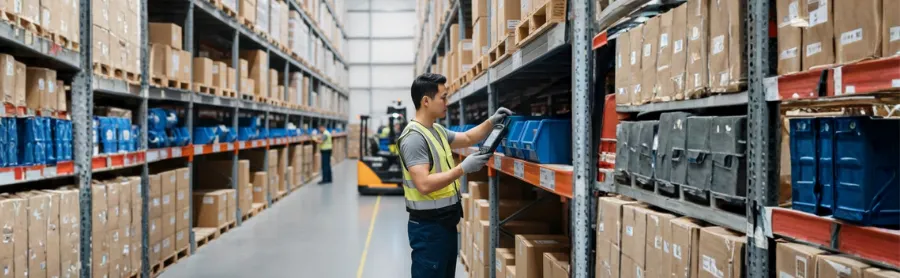
- Inventory & Location Management – Keep track of stock levels and item locations in real time. Ensure every product is accurately recorded and easy to find, whether in a single warehouse or across multiple locations.
- Inbound Receiving & Putaway Control – Verify incoming stock, assign items to the correct storage locations, and organize inventory efficiently. This ensures products are ready for picking and reduces errors from the start.
- Barcode Scanning & Mobile (PDA) Operations – Use handheld devices or PDAs to scan items during receiving, picking, and packing. This speeds up operations and ensures accuracy at every step.
- Order Management & Optimized Picking Rules – Streamline the picking process with guided workflows and rules that prioritize orders, batch items, or focus on hot-selling products for faster fulfillment.
- Quality Control (QC) Checks – Performs checks during picking and packing to confirm the right items and quantities are prepared for shipment, minimizing mistakes and returns.
- Reporting & Warehouse Analytics – Access insights on inventory movement, order fulfillment, and staff performance. These insights help managers make informed decisions and continuously improve warehouse operations.
What is the Warehouse Process?
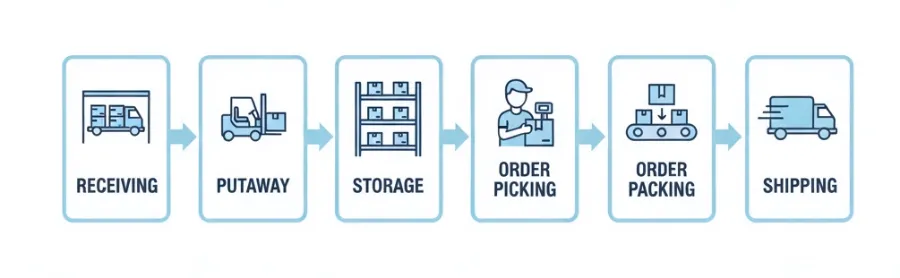
- ReceivingVerify and record incoming stock to ensure the correct quantities and items. Many WMS solutions also allow creating and tracking purchase orders (POs) to simplify inbound inventory management.
- PutawayMove received items to their designated storage locations. Systematic placement ensures easy retrieval and reduces misplaced stock.
- StorageOrganize inventory efficiently, including prioritizing fast-moving items in dedicated picking zones. This ensures quick access to high-demand products and smooths the fulfillment workflow.
- Order PickingPickers receive task lists generated by the WMS and use barcode scanning on a PDA or smartphone to collect items accurately. Optimized routes reduce walking time and errors, speeding up fulfillment.
- Order SortingOnce items are picked, the system helps bulk print customizable shipping labels and sort orders into different baskets based on customer orders. This step ensures orders are organized correctly before packing.
- Order PackingItems are scanned to confirm correct products and quantities. Packages are then packed and labelled, with quality control checks to minimize errors before shipping.
- ShippingOrders are grouped by courier, and shipping manifests are generated to track shipments and cross-check orders before dispatch. This step helps prevent mistakes and ensures timely delivery.
Why We Need a WMS?

- Accurate Inventory Tracking – Keep real-time records of stock levels and locations to prevent overselling, stockouts, and misplaced items.
- Faster Order Fulfillment – Optimize picking and packing workflows to process orders quickly and efficiently.
- Reduced Errors – Automation and barcode scanning reduce mistakes in receiving, picking, packing, and shipping.
- Improved Visibility & Reporting – Access dashboards and operational reports to monitor performance and make informed decisions.
- Scalability & Efficiency – Easily handle growing order volumes and multiple warehouse locations without adding complexity.
To better understand the impact of a WMS, the table below compares manual warehouse management with operations supported by a WMS, highlighting the differences in accuracy, efficiency, and scalability.
Aspect | Manual Warehouse Management (Without WMS) | With Warehouse Management System (WMS) |
Inventory Tracking | Paper-based or spreadsheets, prone to errors | Real-time digital tracking, highly accurate |
Order Picking & Packing | Manual, slow, error-prone | Optimized routes, guided picking, faster fulfillment |
Visibility & Reporting | Limited, delayed, difficult to analyze | Real-time dashboards, instant reports, better decision-making |
Scalability | Hard to scale as orders grow | Easily scales with business growth and multiple warehouses |
Benefits of Using a WMS
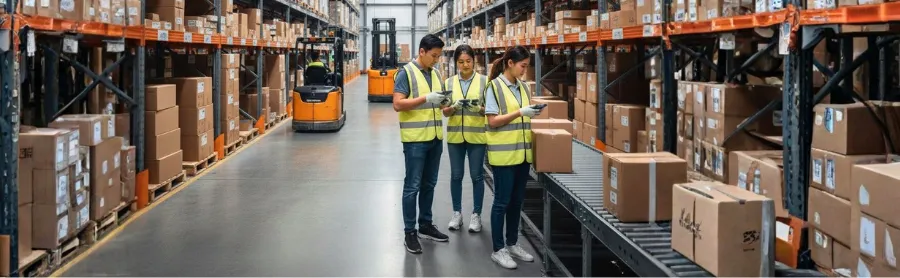
- Reduce Picking and Shipping Errors – Automation and barcode scanning ensure orders are accurate every time.
- Faster Order Fulfillment – Streamlined workflows speed up picking, packing, and shipping.
- Improved Inventory Accuracy – Real-time tracking keeps stock levels precise and prevents overselling.
- Lower Operational Costs – Reduce manual work, mistakes, and wasted resources.
- Better Customer Satisfaction – Deliver the right products on time, every time.
- Scalable Operations – Easily handle growth, more orders, and multiple warehouse locations.
Who Needs a WMS?

- E-commerce Sellers – Manage multiple SKUs, marketplaces, and orders efficiently.
- Retailers with Multiple Products – Keep accurate stock across stores or warehouse locations.
- 3PL Providers – Handle client orders and inventory reliably.
- SMEs Scaling Operations – Automate processes to grow without mistakes.
- Businesses Facing Stock Errors – Reduce picking, packing, and shipping mistakes.
How to Choose a WMS

- Business Size & Order Volume – Pick a solution that can scale as your order volume and warehouse operations grow.
- Number of Warehouses / Multi-Location Support – Ensure the WMS can manage inventory across multiple locations if needed.
- Multi-Channel Integration – Sync seamlessly with marketplaces such as Shopee and Lazada, e-commerce platforms, and POS systems.
- Ease of Use / Staff Training – A user-friendly interface helps your team adopt the system quickly and efficiently.
- Customization & Automation Features – Look for picking rules, quality control, and reporting capabilities that can be tailored to your workflows.
- Pricing & Support – Consider subscription models, onboarding assistance, and ongoing vendor support.
SiteGiant WMS: Streamline Your Warehouse Operations

SiteGiant WMS Key Features
- Stock In with PDA / Smartphone (Purchase Order Based Receiving): Create Purchase Orders in SiteGiant WMS and perform receiving, putaway, and storage using a PDA / smartphone. Incoming stock quantities are automatically updated and synced across all integrated sales channels.
- Real-Time Inventory Sync Across Channels: Inventory levels are updated instantly whenever stock is received, picked, or shipped. This prevents overselling, reduces stockouts, and ensures accurate inventory visibility across platforms such as Shopee, Lazada, and e-commerce stores.
- Rack & Location Management with Barcode Control: Generate barcodes for racks, bins, or individual items to organize warehouse locations clearly. Every product is linked to a specific storage location, making it easier for staff to locate items quickly during picking and stock checks.
- Assigned Stock Check Task via PDA / Smartphone: Assign stock-check tasks to staff and execute them using a PDA / smartphone. Barcode scanning improves inventory accuracy and helps identify discrepancies early without disrupting daily operations.
- System-Assigned Picking Tasks (Paperless Operations): Picking tasks are automatically assigned by the system and sent directly to the PDA / smartphone. This eliminates the need for printed picking lists and ensures pickers follow optimized workflows.
- Multiple Picking Modes: Support flexible picking strategies such as pick then sort, pick & sort, wave picking, and zone picking, allowing warehouses to adapt to different order volumes and layouts.
- Wave Shipment: Group multiple orders into a single picking wave to optimize workflow. This reduces walking time, improves efficiency, and speeds up order processing.
- Smart Barcode Scanning: Scan items during receiving, picking, packing, and stock checks using a PDA / smartphone. This reduces manual errors and ensures every item is accurately tracked throughout the fulfillment process.
- Optimized Picking & Hot-Selling Zones: Arrange fast-moving items in dedicated hot-selling zones to shorten picking routes, reduce walking time, and speed up order fulfillment.
- ParcelGuard (Record Packing Process): Record the packing process while verifying items and quantities. This ensures the correct orders are shipped, reduces errors, and disputes.
- Quality Control (QC) Before Shipping: Perform final barcode checks before parcels are sealed and dispatched, ensuring order accuracy and reducing order return issues.
- Employee KPI Monitoring: Track staff productivity and performance with real-time KPIs. Managers can identify bottlenecks and continuously improve warehouse efficiency.
- Multi-Warehouse Support & Integrations: Manage multiple warehouse locations from a single system and integrate seamlessly with marketplaces, e-commerce platforms, and POS systems for centralized inventory and order management.
Together, these features help businesses run more accurate, efficient, and scalable warehouse operation. With SiteGiant WMS, teams can reduce manual work, minimize errors, and handle growing order volumes confidently — all from a single, integrated system.
Proven Results from Local Sellers
"We fulfilled a high volume of orders from the 11.11 sales campaign just within 2 days!"
After implementing SitiGiant WMS, we can efficiently allocate picking, sorting and packing tasks to our staff. It is even easier to train a new team now. Thanks to SiteGiant WMS, we can fulfill a high volume of orders from the 11.11 sales campaign just within 2 days.⭐⭐⭐⭐⭐ 5/5
Syed Faisal
New World Depot
"Our order picking and packing process is 50% faster!"
After implementing SiteGiant WMS, our order picking and packing process is 50% faster. With PDA or smartphone scanning, pickers can easily access the item name, location, and quantity. This saves time, reduces errors and increases efficiency. SiteGiant WMS is the best choice for solving warehouse challenges.⭐⭐⭐⭐⭐ 5/5
Hakim
Orange Spare Part
"We did a comparison and found that SiteGiant Express Fulfillment is 3x faster than our normal fulfillment method."
We can filter the orders based on picking zone and rack group. SiteGiant will automatically help us to consolidate and separate the items for picking based on zone and rack group. Our pickers just have to follow the row in the rack to pick the item smoothly.⭐⭐⭐⭐⭐ 5/5
Alexis Foong
KK Smartbuy
Frequently Asked Questions (FAQ)
Is a Warehouse Management System (WMS) only for large warehouses?
What is the difference between WMS and inventory management software?
Inventory software mainly tracks stock levels, while a WMS manages all warehouse operations, including inbound, outbound and reporting for more efficient and accurate fulfillment.
How much does a WMS cost?
Does WMS integrate with online marketplaces?
Will my staff need training to use a WMS?
Conclusion